Modbux
A free, open-source Modbus client and server simulation tool for Windows, macOS and Linux.
Read, write, scan, and simulate with full datatype support. See every interpretation at once. Test before you go on-site.
Features
See Every Interpretation
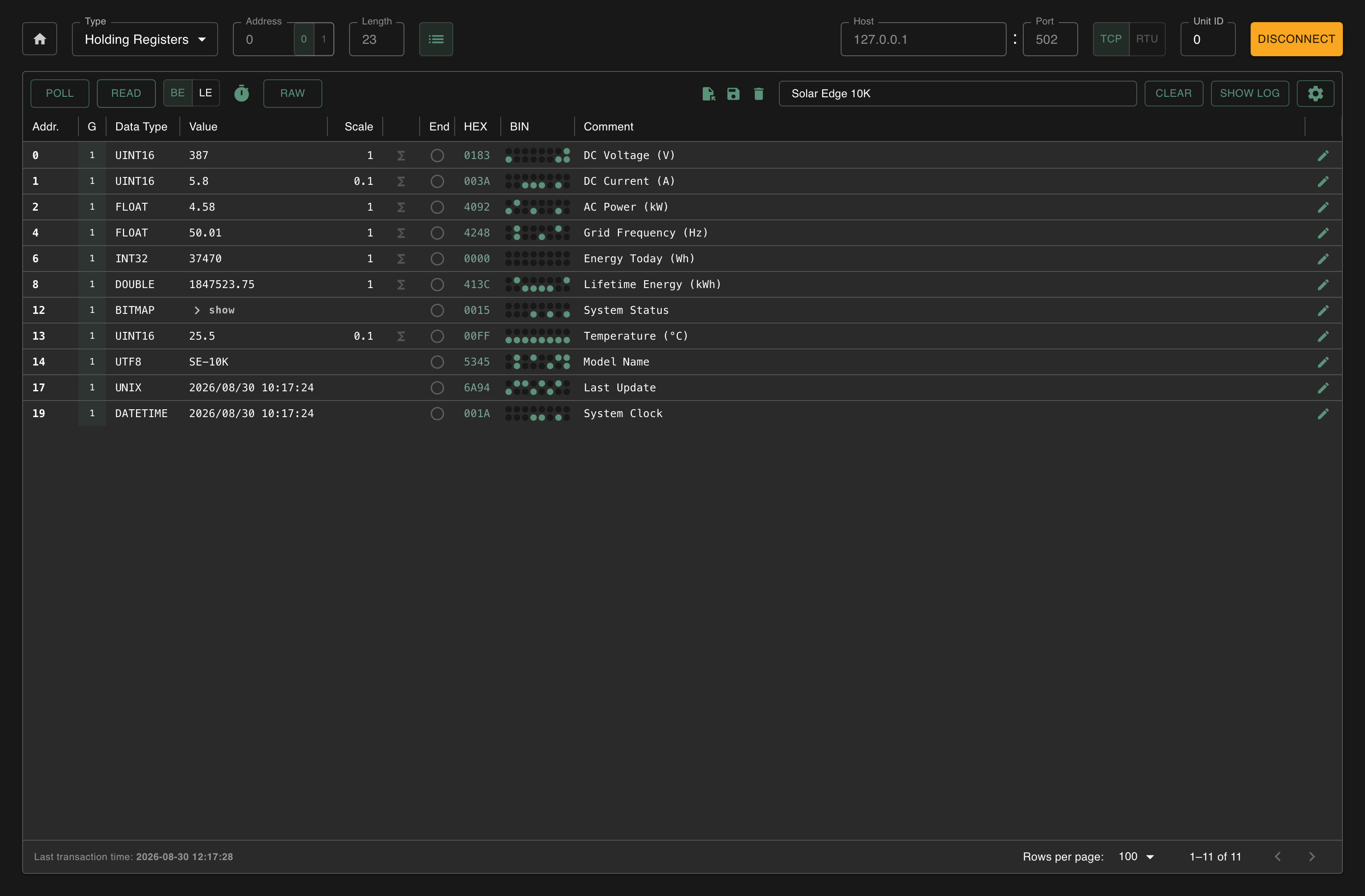
Advanced Mode shows int16, uint16, int32, uint32, float and more side-by-side for every register. Stop guessing which data type is correct. See them all at once.
Per-Register Data Types
Assign a specific data type to each register: integers, floats, timestamps, UTF-8 strings or bitmaps. Add scaling factors and linear interpolation to convert raw values into real units.
Bitmap Visualization
Define 16-bit bitmaps with per-bit labels, colors (default, warning, error) and invert logic. See at a glance which alarms are active and which bits mean what.
Scan & Discover
Scan Unit IDs to find active devices on the bus. Scan register ranges to discover where data lives. No more guessing wrong addresses from outdated documentation.
Server Simulation
Simulate Modbus devices over TCP or RTU. Run up to 10 TCP servers with 256 Unit IDs each, or connect an RTU server to a serial port. Use value generators with configurable intervals to produce realistic test data including timestamps.
Split Mode
Run client and server side-by-side in separate windows. Great for learning Modbus or testing PLC implementations against your own simulations before going on-site.
Everything Persists
Connections, register configs, server setups: everything saves automatically between sessions. Save and load complete configurations as versioned JSON files.
Cross-Platform
A modern Electron and React interface that runs identically on Windows, macOS and Linux, Intel, Apple Silicon and ARM64. Modbus TCP and RTU with automatic COM port discovery, plus RTU over TCP for serial-to-Ethernet gateways. Adjustable timeouts and big/little-endian toggle for any device.
Why This Exists
Four years ago, I was thrown into a CHP plant commissioning with zero Modbus experience. The client didn't know the addresses. I didn't know the protocol. I had a scanner that found... something... and a hex reader that showed me values I couldn't interpret.
Is that temperature in register 100 or 101? Does the documentation start at 0 or 1? Why does TIA Portal call it 40000 when the manual says holding register 0? Is it big-endian or little-endian?
This went on for four years. I watched colleague after colleague hit the same walls. The tools we had could read a float or an int if you were lucky, but they never gave you the full picture. Endianness? Swap the registers yourself and hope. Documentation starting at the wrong offset? Good luck.
So I built something that shows you every possible data interpretation at once. That scans not just for devices, but for where the actual data is. That lets you test PLC implementations against simulated devices before you're on-site hoping everything works.
Get startedFree, and staying free
No account, no trial, no paid tier. If Modbux saved you an afternoon on site, you can buy me a coffee. The current goal is an Apple Developer certificate, so macOS stops warning that the app is damaged on first launch.
Pro Tip
Saved configs are JSON. Show Claude, Gemini, or any other LLM a few example registers, paste your device documentation, and ask it to complete the mapping. Load it back into Modbux.
Open Source
Modbux is free and open source. Found a bug? Have a feature idea? Contributions are welcome — open an issue or submit a pull request on GitHub.
git clone https://github.com/ploxc/modbux.git
cd modbux
yarn
yarn dev          # development mode
yarn build:win    # or build:mac / build:linux